The Smarter Way to Monitor, Track & Improve Your Remote Workforce — Without Them Knowing








Managing a remote workforce without the right tools means flying blind. You don't know which websites your team is browsing, which applications they're using, or whether they're actually working during paid hours. That uncertainty costs you productivity, revenue, and competitive edge.
Silent App is purpose-built remote employee monitoring software that gives managers and business owners complete, real-time visibility into employee screen activity, application usage, keystroke patterns, and productivity trends — all running silently in the background. Whether your employees are spread across three cities or three continents, Silent App keeps you in control without disrupting their workflow.
Silent App runs completely in the background — no system tray icon, no notifications, no interference. Employees continue working normally while you gain accurate, unbiased activity data in real-time.
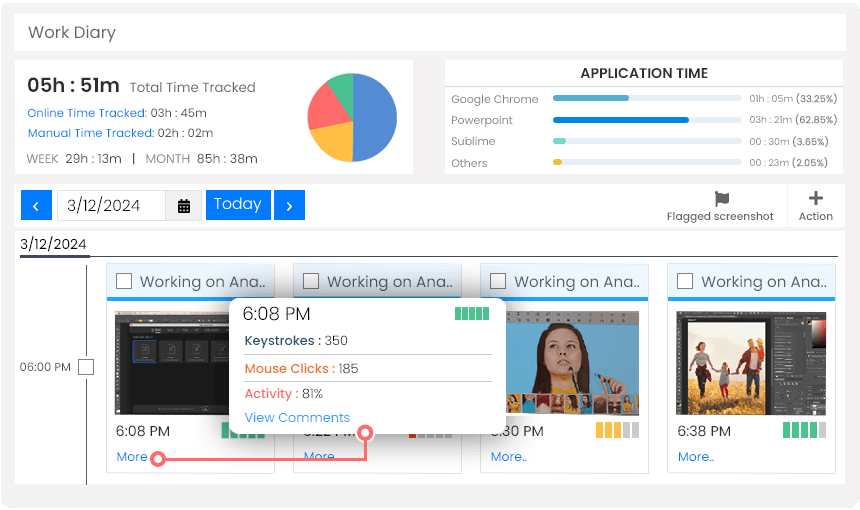
Capture periodic screenshots and continuous screen recordings automatically. Configure screenshot intervals to your preference and store everything securely in the cloud for review at any time.
See exactly which applications and websites remote employees use during work hours. Categorize apps as Productive, Unproductive, or Neutral to build an accurate picture of how time is being spent.
Measure real engagement through keystroke logging and mouse activity tracking. Instantly distinguish genuinely active employees from those using tools to fake activity.
An intuitive live dashboard gives you a real-time overview of your entire remote team's productivity. AI-generated reports highlight trends, idle periods, and performance patterns — so you always know what's happening.
Go beyond screen monitoring with automated video recording and audio capture. Get a comprehensive view of the remote work environment and ensure your team stays focused and accountable.
| Features |

|
Teramind | Insightful | Desk Track | Time Doctor | Monitask |
|---|---|---|---|---|---|---|
| Unlimited Client Accounts | ✕ | ✕ | ✕ | ✕ | ✕ | |
| Dynamic Reporting | ✕ | ✕ | ✕ | ✕ | ||
| Screen Recording | ✕ | ✕ | ✕ | |||
| Audio and Video Surveillance | ✕ | ✕ | ✕ | |||
| Local System Tracking | ✕ | ✕ | ✕ | |||
| Geolocation Tracking | ✕ | ✕ | ✕ | |||
| Pricing | $5.10 per user / month |
$15.06+ per user / month |
$8.00+ per user / month |
$5.99+ per user / month |
$5.90+ per user / month |
$5.99+ per user / month |
Get full access to stealth employee monitoring, screen recording, keystroke tracking, and productivity dashboards from day one.
Start Your Free 7-Day Trial TodayBefore Silent App, I had no real visibility into what our remote team was doing during work hours. Now I can see exactly which apps they use, how productive they are, and spot issues before they become problems. It completely changed how we manage remote work.
We tried three different remote monitoring tools before Silent App. The stealth mode and keystroke tracking gave our HR team insights we never had before — and it integrates perfectly with our existing workflow.
Silent App's installation took minutes and we had our entire remote team monitored the same afternoon. The productivity dashboard helps me spot disengagement early — that's invaluable for a growing startup.