Employee Tracking Software That Captures What's Really Happening on Every Screen

Accurate Employee Tracking for Screen Activity, Keystrokes, App Usage & Idle Time

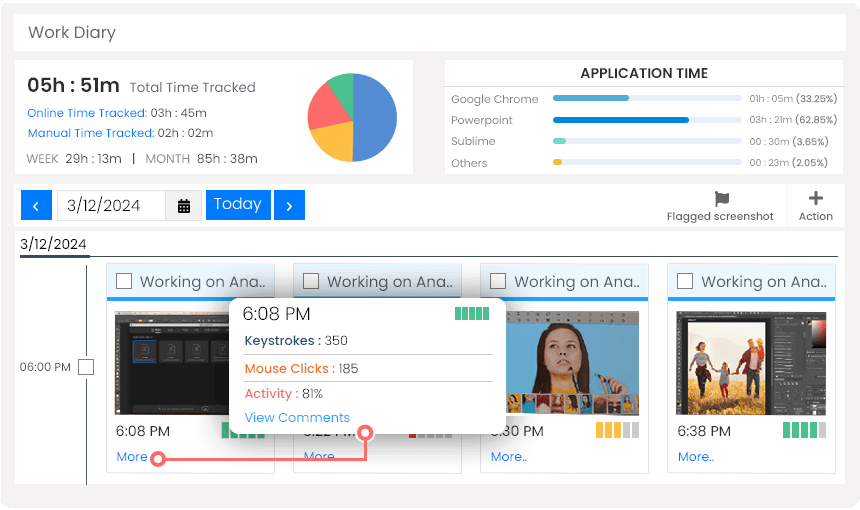
  • Track employee screen sessions, keystrokes & mouse activity in real-time
  • Eliminate guesswork with automated, objective data capture
  • Instant visibility into who's active, idle, or off-task
  • Generates detailed tracking reports automatically — no manual work required
Remote Team Collaboration Graphic

Inaccurate employee tracking leads to performance blind spots, resource misallocation, and frustrated managers making decisions based on incomplete data. Whether you're tracking remote workers or in-office staff, precision matters.

Silent App's employee tracking software automates screen activity logging, keystroke monitoring, application tracking, and idle time detection — so your workforce data is always accurate, objective, and ready for whatever decisions you need to make.

Key Features & Benefits

Automated Screen & Activity Tracking

Silent App begins tracking the moment an employee's computer starts. Screen activity, application usage, and browsing behavior are all captured automatically — no manual inputs, no gaps, no reconciliation.

Keystroke & Mouse Activity Monitoring

Track keyboard and mouse interactions to objectively measure employee engagement. Identify genuinely active work sessions versus inactive or low-engagement periods that impact overall productivity.

Idle Time & Inactivity Alerts

Get proactive alerts when employees show extended idle periods, switch away from work applications, or display activity patterns inconsistent with productive work — so you can act on facts, not suspicions.

Exportable Activity Reports

Export clean, detailed activity tracking data in Excel and PDF formats. Use it for performance reviews, project cost analysis, or operational reporting without any manual data preparation.

Stealth Mode Tracking

Silent App runs completely in the background — no employee-facing prompts, no system tray presence, no performance impact. Tracking data reflects natural work behavior rather than performance-adjusted output.

Historical Activity Data

Access full activity and productivity history for every employee. Review screen recordings, application logs, and keystroke data over any date range for performance analysis and operational audit trails.

How Silent App Compares

Feature Silent App Teramind Insightful Desk Track Time Doctor Monitask
Unlimited Client Accounts
Dynamic Reporting
Screen Recording
Audio and Video Surveillance
Local System Tracking
Geolocation Tracking
Pricing $5.10
per user / month
$15.06+ $8.00+ $5.99+ $5.90+ $5.99+

What Our Customers Say

Start Your Free 7-Day Trial Today

Stop guessing what your team is doing and start tracking it accurately with stealth screen tracking, keystroke monitoring, idle time detection, and exportable reports.

No Credit Card Required | Cancel Anytime

Frequently Asked Questions

Silent App tracks screen recordings, automated screenshots, application usage, websites visited, keystroke patterns, mouse activity, and idle time. This gives managers a comprehensive, objective record of how each employee spends their work hours.

Yes. Silent App stores complete activity logs for every employee, allowing managers to review screen recordings, application history, and productivity data over any selected date range — ideal for performance reviews and operational audits.

Yes. Silent App allows managers to export complete tracking data, making it straightforward to incorporate into performance reports, project cost analyses, and management presentations.

All activity and productivity records in Silent App are automatically timestamped. In the event of a dispute, managers can access the complete screen recording and activity log for any employee and any date range, providing objective, verifiable evidence.

Yes. Silent App can be deployed on any company-managed computer regardless of employment type. Tracking rules and reporting can be configured per user group to match different monitoring requirements.